

Introduction
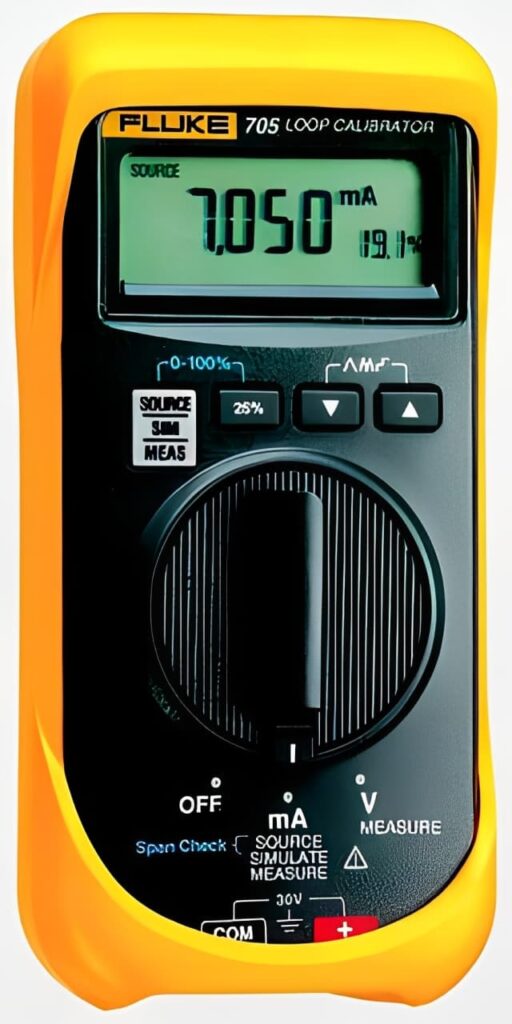
In modern process work, a Fluke Current Loop Calibrator helps technicians prove that a 4 to 20 mA signal is correct from field device to controller. Because loops run critical pumps, valves, and indicators, you need repeatable results you can trust. Therefore, choosing the right calibrator is as important as knowing how to use it.
What is a current loop calibrator used for?
A current loop calibrator is a handheld tool that can measure, source, and simulate mA signals. It verifies that instruments, wiring, and control systems agree across the full range.
In practice, you use it to confirm transmitter output, drive a loop to check scaling, or troubleshoot a mismatch between a sensor and a control room display. As a result, you can isolate faults faster and cut unnecessary part swaps.
Where it fits in a typical loop
A standard loop may include sensors in the field, cables back to a panel, and a controller that drives final elements. In addition, there may be connectors, contactors, and terminal blocks that introduce resistance or intermittent connections.
Use your calibrator at multiple points to compare expected versus measured current. If readings drift, inspect grips on test leads, check insulation damage, and verify clean contact surfaces.
Why choose a Fluke Current Loop Calibrator for industrial work?
Fluke instruments are widely used in maintenance teams because they are designed for repeatability and field durability. Moreover, the user interface is direct, which supports faster task handoff between shifts.
Look for these product benefits that matter on the job:
- Stable mA sourcing to validate control loop scaling
- Accurate measurement for both steady and changing signals
- Clear modes for source, simulate, and measure workflows
- Practical ergonomics for one hand operation around panels
Because you are often working near energized equipment, select a model that supports the safety categories you need, and follow site procedures.
Accuracy and confidence in troubleshooting
When a process alarm appears, time is limited. Therefore, a calibrator that quickly reaches the setpoint and holds it steady helps you confirm whether the issue is electronics, wiring, or configuration.
If a loop drops under load, check for loose switches, aging fuses, or a poor connector that heats under current. Additionally, inspect for contamination from oils or moisture in junction boxes.
Key features that make a product the right fit
Different sites need different capabilities. However, most teams benefit from a calibrator that supports both sourcing and simulation, plus reliable measurement.
Source, simulate, and measure in one workflow
Sourcing sends a known current into the loop. Simulation mimics a transmitter output while the loop power is supplied elsewhere. Measurement confirms what is actually flowing.
When you can do all three, you can test a controller input, validate a field device, and confirm loop integrity without changing tools. Consequently, you reduce setup time and minimize tool clutter.
Step and ramp functions for control validation
Step outputs help verify alarms and interlocks. Ramp outputs help check smooth response, such as valve positioning or proportional control.
Use small steps to validate deadband and tuning in controllers. Also, record the response so you can compare against baselines.
How to use it in the field without wasting time
A consistent routine helps you get reliable results. First, review the loop diagram and confirm the correct points to break or measure. Next, check isolation and lockout procedures based on site safety rules.
Then follow a clean test sequence:
- Inspect cables for cuts or crushed sections
- Verify polarity and secure connectors
- Confirm loop power status before selecting simulate or source
- Apply a known current, then compare reading at the controller
- Document setpoints, measured values, and environmental notes
Because thermal conditions change behavior, note ambient heat, panel temperature, or hot spots from contactors. If needed, use thermal pads as a temporary barrier when routing leads near hot surfaces.
Reducing noise and intermittent faults
Intermittent issues are common. Therefore, gently flex cables and watch for spikes. Also, look for loose terminals that open under vibration.
If the loop shares conduits with high power lines, electrical noise may appear. In that case, check grounding, cable shielding, and separation practices.
Practical applications in modern plants
A loop calibrator supports commissioning, preventive maintenance, and rapid fault response. Moreover, it is useful in mixed systems where analog loops share space with microcontrollers or embedded controllers on skids.
Commissioning and verification
During startup, you need to verify scaling and signal mapping. Use a calibrator to prove each channel at 0 percent, 50 percent, and 100 percent.
Additionally, verify that status LEDs on panels match your injected values, and confirm any laptop based configuration tools on laptops show the same span and damping used in the field. In packaged skids, microprocessors may handle scaling, so validate the full path end to end.
Troubleshooting in mixed signal environments
If a loop is correct at the transmitter but wrong at the cabinet, focus on connectors, terminal blocks, and any intermediate contactors. As a result, you can target the true fault without guesswork.
When a device shows unstable current, investigate whether a capacitor in the power supply is failing or whether wiring resistance has crept up over time.
Buying considerations for a product focused decision
When selecting a Fluke Current Loop Calibrator for your kit, match features to daily tasks and the environment. Also, consider documentation needs so your readings support compliance and handover.
Use this quick checklist:
- Accuracy and output resolution that fit your tolerances
- Rugged construction for plant floors and outdoor work
- Battery life that covers long shifts and shutdowns
- Included accessories such as leads, clips, and protective case
Finally, standardize your test method and record results. When your toolset is consistent, your team works faster, improves safety, and maintains control loop performance with confidence.